
452 字
2 分鐘
以 Google Apps Script 做 API,將 Google Sheets 作為資料庫
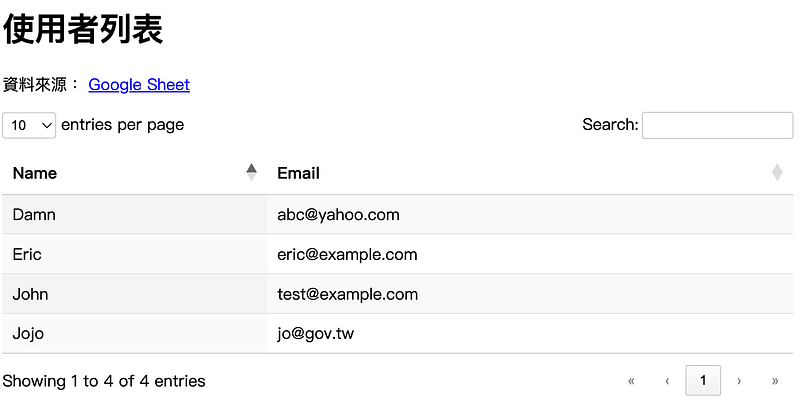
如果你有一份 Google Sheets 想讓其他前端專案、LINE Bot、或第三方服務可以即時存取資料,但又不想架設伺服器或資料庫,其實只需要一個 Google 帳號和 Apps Script,你就能打造一個簡單的 API,把試算表當作輕量級資料庫使用!
範例
以下做一個簡單的範例,我將網站部署在 Github Pages 上,前端使用 Datatables 來呈現資料,將 Google Sheets 作為資料庫,後端使用 Google Apps Script 來做 API。
範例網站
資料庫:Google Sheets
如下圖所示,以使用者表單為例,建立兩個欄位:Name、Email
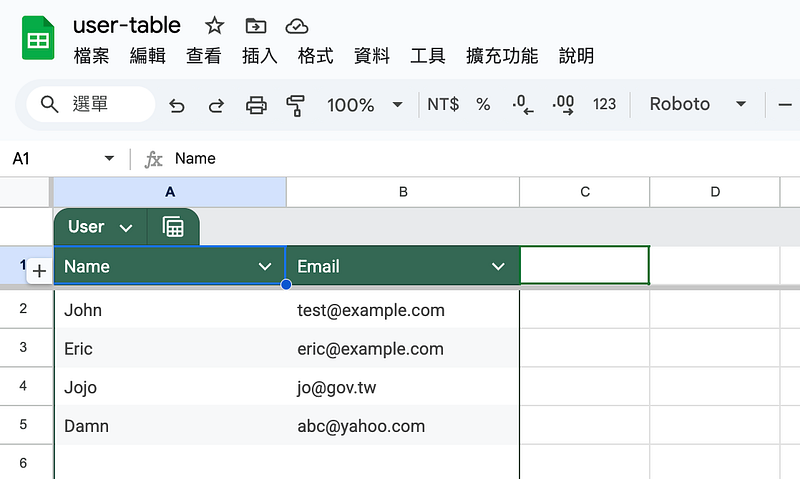
Google Sheets 資料庫
後端:Google Apps Script
在 Google Sheets 選擇「擴充工具」「Apps Script」,將下面程式進行部署。
其中 OnlyCurrentDoc 限定程式只會使用該 Google Sheets 的資料。讀取 User 資料表,將所有資料讀取出來,去除第一行表頭,轉成 JSON。
/**@OnlyCurrentDoc*/
function doGet(e) { const sheet = SpreadsheetApp.getActiveSpreadsheet().getSheetByName("User"); const data = sheet.getDataRange().getValues().slice(1); return ContentService.createTextOutput(JSON.stringify(data)).setMimeType( ContentService.MimeType.JSON );}範例 API 可以查看結果,結果如下,會是一個二維陣列。
[ [ "John", "test@example.com" ], [ "Eric", "eric@example.com" ], [ "Jojo", "jo@gov.tw" ], [ "Damn", "abc@yahoo.com" ]]前端:Datatables
在前端使用 Datatables 套件,將資料呈現出來。透過 Datables 的 Ajax 功能來載入 Googles Apps Script 做的 API 資料。
<table id="userTable" class="display"> <thead> <tr> <th>Name</th> <th>Email</th> </tr> </thead></table>
<script> $("#userTable").DataTable({ ajax: { url: "https://script.google.com/macros/s/AKfycbzrVcYvRfKQGQWo4_brvwuN_LfJqErvYaGJnkSLBmwSPlcQ2spBUfCBvIg_MGHlk9qeFw/exec", dataSrc: "", }, });</script>結語
透過以上操作就可以簡單的將 Google Sheets 作為資料庫,呈現在網站上。不過還是有一些缺點的,Google Apps Script 對於運算時間有限制,每天只能加總運算 90 分鐘,每次運算不能超過 6 分鐘,詳見 Google 官方文件。