
495 字
2 分鐘
[範例] node-forge 憑證驗證 PKCS1 簽章值 | 自然人憑證開發筆記
前文說明過如何透過前端做 PKCS1 的簽章,本文將說明如何為 PKCS1 簽章值進行驗簽。
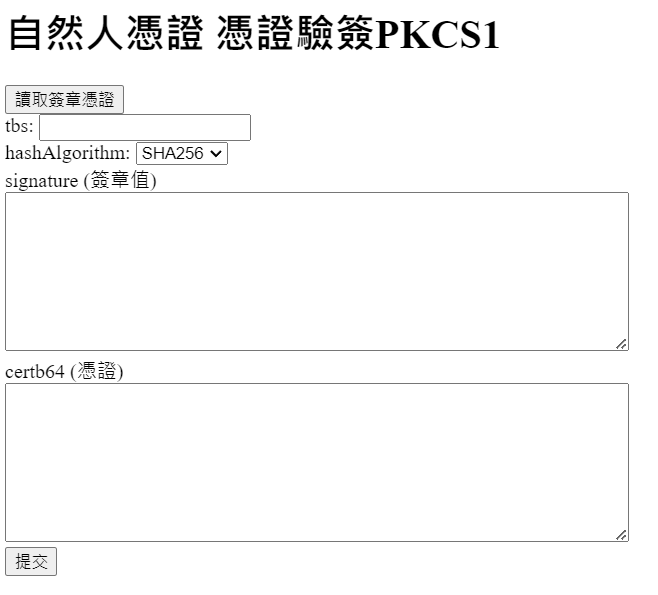
Demo
前端程式碼
驗證 PKCS1 時,我們需要 TBS、Hash 演算法、憑證、簽章值,Javascript 用來讀取簽章憑證。
<h1>自然人憑證 憑證驗簽PKCS1</h1><input type="button" value="讀取簽章憑證" onclick="getCert()" /><form action="https://cert.modatw.workers.dev/api/pkcs1VerifyWithCert" method="post"> tbs: <input type="text" name="tbs" /><br> hashAlgorithm: <select name="hashAlgorithm"> <option value="SHA1">SHA1</option> <option value="SHA256" selected>SHA256</option> <option value="SHA384">SHA384</option> <option value="SHA512">SHA512</option> </select><br> signature (簽章值)<br> <textarea name="signature" rows="8" cols="65"></textarea><br> certb64 (憑證)<br> <textarea name="certb64" rows="8" cols="65"></textarea><br> <input type="submit"></form>
<script> let popupForm; let timeout;
function getCert() { popupForm = window.open( "http://localhost:61161/popupForm", "popupForm", "height=200, width=200, left=100, top=20" ); timeout = setTimeout(() => { popupForm.close(); alert("尚未安裝元件"); }, 5000); }
function receiveMessage(event) { if (event.origin !== "http://localhost:61161") return;
let ret = JSON.parse(event.data); if (ret.func === "getTbs") { clearTimeout(timeout); const tbsData = { func: "GetUserCert" }; popupForm.postMessage(JSON.stringify(tbsData), "*"); } else { const data = JSON.parse(event.data); const cert = data.slots[0].token.certs[2].certb64; document.getElementsByName("certb64")[0].value = cert; } }
window.addEventListener("message", receiveMessage, false);</script>後端程式碼
以 Cloudflare Workers 搭配 node-forge 套件來實作驗簽。
// 本範例環境為 Cloudflare Workers// 程式碼適用於 NodeJS,需安裝 node-forge
// 以下為 Cloudflare Workers 可用的 node-forge// https://gist.github.com/chouhsiang/2dad8070e517b61cec3d175b1832c4beimport { forge } from "./node-forge.js";
export default { async fetch(request, env, ctx) { try { const { pathname } = new URL(request.url); if (pathname == "/api/pkcs1VerifyWithCert" && request.method == "POST") { return await pkcs1VerifyWithCert(request); } return new Response(""); } catch (e) { return new Response(e); } },};
async function pkcs1VerifyWithCert(request) { const formData = await request.formData();
// 從憑證提取公鑰 const begin = "-----BEGIN CERTIFICATE-----"; const end = "-----END CERTIFICATE-----"; const certPem = begin + formData.get("certb64") + end; const cert = forge.pki.certificateFromPem(certPem); const publicKey = cert.publicKey;
// 將簽章值轉為 Byte const signature = formData.get("signature"); const signatureBytes = forge.util.decode64(signature);
// 將 tbs 進行 Hash const tbs = formData.get("tbs"); const plainTextBytes = forge.util.encodeUtf8(tbs); const hashAlgorithm = formData.get("hashAlgorithm").toUpperCase(); let hashCodeBytes; if (hashAlgorithm == "SHA1") { const md = forge.md.sha1.create(); md.update(plainTextBytes); hashCodeBytes = md.digest().getBytes(); } else if (hashAlgorithm == "SHA256") { const md = forge.md.sha256.create(); md.update(plainTextBytes); hashCodeBytes = md.digest().getBytes(); } else if (hashAlgorithm == "SHA384") { const md = forge.md.sha384.create(); md.update(plainTextBytes); hashCodeBytes = md.digest().getBytes(); } else if (hashAlgorithm == "SHA512") { const md = forge.md.sha512.create(); md.update(plainTextBytes); hashCodeBytes = md.digest().getBytes(); }
// 使用公鑰對 Hash、signature 進行驗證 const verified = publicKey.verify(hashCodeBytes, signatureBytes); if (verified) { return new Response("PKCS1 驗簽成功"); } else { return new Response("PKCS1 驗簽失敗"); }}