
882 字
4 分鐘
[範例] ChtICToken.js 進行數位簽章 | 自然人憑證開發筆記
上一篇透過 JavaScript 做數位簽章,本篇透過 ChtICToken.js 來實作一樣的功能。
範例程式碼
範例程式功能如下,輸入演算法、TBS、PIN等資訊進行簽章。關於 ChtICToken.js 的使用,請參考前篇說明,主要重點在 icToken.sign 的使用。
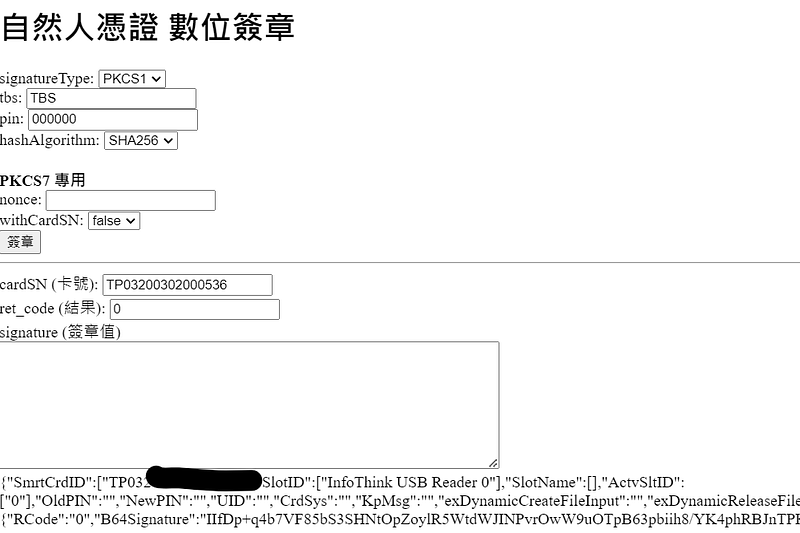
<h1>自然人憑證 數位簽章</h1>signatureType: <select id="signatureType"> <option value="PKCS1" selected>PKCS1</option> <option value="PKCS7">PKCS7</option> <option value="RAW">RAW</option></select><br>tbs: <input type="text" id="tbs" /><br>pin: <input type="text" id="pin" /><br>hashAlgorithm: <select id="hashAlgorithm"> <option value="SHA1">SHA1</option> <option value="SHA256" selected>SHA256</option> <option value="SHA384">SHA384</option> <option value="SHA512">SHA512</option></select><br><br><b>PKCS7 專用</b><br>nonce: <input type="text" id="nonce" /><br>withCardSN: <select id="withCardSN"> <option value="false" selected>false</option> <option value="true">true</option></select><br><input type="button" value="簽章" onclick="getICToken().goodDay(sign)"><br><hr>cardSN (卡號): <input type="text" id="cardSN" /><br>ret_code (結果): <input type="text" id="ret_code" /><br>signature (簽章值)<br><textarea id="certb64" rows="8" cols="65"></textarea><br><div id="info"></div>
<script src="https://fido.moi.gov.tw/pt/assets/ChtICToken.js"></script><script> function setData() { const icToken = getICToken(); document.getElementById("info").innerHTML = JSON.stringify(icToken); document.getElementById("cardSN").value = icToken.SmrtCrdID[0]; document.getElementById("ret_code").value = icToken.RetObj.RCode; document.getElementById("signature").value = icToken.RetObj.B64Signature; }
function sign() { const icToken = getICToken(); const tbs = btoa(document.getElementById("tbs").value); const pin = document.getElementById("pin").value; const hashAlgorithm = document.getElementById("hashAlgorithm").value; const signatureType = document.getElementById("signatureType").value; const keyidb64 = btoa("KEYX"); const nonce = document.getElementById("nonce").value; const withSigningTime = "true"; const withCardSN = document.getElementById("withCardSN").value; const checkValidity = "true"; icToken.sign(tbs, pin, hashAlgorithm, setData, signatureType, keyidb64, nonce, withSigningTime, withCardSN, checkValidity); }</script>sign(B64ToBeSign, UserPIN, HashAlg, RevFun, PKCSSignType, keyidb64, nonce, withSigningTime, withCardSN, checkValidity)
sign 用於簽章,背後是呼叫API http://127.0.0.1:61161/sign,先了解前篇關於 /sign 的說明。接著來說明參數:
- B64ToBeSign:等同 /sign 的 tbs 欄位,為 Base64 格式,tbsEncoding=base64 會被固定啟用。
- UserPIN:等同 /sign 的 pin 欄位
- RevFun:Callback Function
- keyidb64:等同 /sign 的 keyidb64 欄位
- nonce:等同 /sign 的 nonce欄位
- withSigningTime:等同 /sign 的 withSigningTime欄位
- withCardSN:等同 /sign 的 withCardSN欄位
- checkValidity:等同 /sign 的 checkValidity欄位
以下是 sign 的原始碼
ICToken.prototype.sign = function ( B64ToBeSign, UserPIN, HashAlg, RevFun, PKCSSignType, keyidb64, nonce, withSigningTime, withCardSN, checkValidity) { if (typeof PKCSSignType === "undefined") PKCSSignType = "PKCS1"; if (typeof keyidb64 === "undefined") keyidb64 = "__NotExistedTag__"; if (typeof nonce === "undefined") nonce = "__NotExistedTag__"; if (typeof withSigningTime === "undefined") withSigningTime = "__NotExistedTag__"; if (typeof withCardSN === "undefined") withCardSN = "__NotExistedTag__"; if (typeof checkValidity === "undefined") checkValidity = "__NotExistedTag__"; UserSign( B64ToBeSign, encodeURIComponent(UserPIN), HashAlg, RevFun, PKCSSignType, keyidb64, encodeURIComponent(nonce), encodeURIComponent(withSigningTime), encodeURIComponent(withCardSN), encodeURIComponent(checkValidity), "none" );};
function UserSign( B64ToBeSign, UserPIN, HashAlg, UrRevFUN, PKCSSignType, keyidb64, nonce, withSigningTime, withCardSN, checkValidity, SignType) { var l_iRetCode = 0; var l_B64Signature = ""; var l_vRMsg; var l_vRetData;
if (typeof PKCSSignType === "undefined") PKCSSignType = "PKCS1"; if (typeof keyidb64 === "undefined") keyidb64 = "__NotExistedTag__"; if (typeof nonce === "undefined") nonce = "__NotExistedTag__"; if (typeof withSigningTime === "undefined") withSigningTime = "__NotExistedTag__"; if (typeof withCardSN === "undefined") withCardSN = "__NotExistedTag__"; if (typeof checkValidity === "undefined") checkValidity = "__NotExistedTag__";
if (PKCSSignType == "PKCS7") { InToken.SType = "PKCS7"; } else { //Default: "PKCS1" }
if (SignType.localeCompare("Cryp") == 0) { InToken.FUN = "umakeSig"; GARevFun.FUN = "StSgn"; } else { InToken.FUN = "MakeSignature"; GARevFun.FUN = "StSgn"; }
InToken.PIN = UserPIN; InToken.TBS = B64ToBeSign; InToken.keyidb64 = keyidb64; InToken.nonce = nonce; InToken.withSigningTime = withSigningTime; InToken.withCardSN = withCardSN; InToken.checkValidity = checkValidity;
GARevFun.Para = HashAlg.toUpperCase(); GARevFun.UrFUN = UrRevFUN;
switch (GARevFun.Para) { case "SHA256": InToken.HashAlgorithm = "SHA256"; break; case "SHA1": InToken.HashAlgorithm = "SHA1"; break; default: l_iRetCode = 3400; l_vRMsg = rMsg(l_iRetCode, ""); break; }
if (B64ToBeSign == null) { l_iRetCode = 3402; l_vRMsg = rMsg(l_iRetCode, ""); }
if (UserPIN == null) { l_iRetCode = 3403; l_vRMsg = rMsg(l_iRetCode, ""); }
if (HashAlg == null) { l_iRetCode = 3404; l_vRMsg = rMsg(l_iRetCode, ""); }
if (UrRevFUN == null) { l_iRetCode = 3405; l_vRMsg = rMsg(l_iRetCode, ""); alert("輸入參數錯誤或不足"); }
if (checkGoodDay() == false) { l_iRetCode = 3401; l_vRMsg = rMsg(l_iRetCode, ""); }
if (l_iRetCode == 0) { if (SignType.localeCompare("Cryp") == 0) { SendData( "http://localhost:61161/umakeSig", "http://localhost:61161/ChtPopupForm", "IC卡讀取中", Gbjct.PppFrmStyle, StSgn, UrRevFUN ); } else { SendData( "http://localhost:61161/sign", "http://localhost:61161/ChtPopupForm", "IC卡讀取中", Gbjct.PppFrmStyle, StSgn, UrRevFUN ); } } else { l_vRetData = '{"RCode":"' + l_iRetCode + '", "B64Signature":"' + l_B64Signature + '","RMsg":"' + l_vRMsg + '"}'; InToken.RetObj = JSON.parse(l_vRetData); if (UrRevFUN && typeof UrRevFUN === "function") UrRevFUN(); }}以下是簽章回傳結果的格式
{ "SmrtCrdID": ["<卡號>"], "SlotID": ["InfoThink USB Reader 0"], "SlotName": [], "ActvSltID": ["0"], "OldPIN": "", "NewPIN": "", "UID": "", "CrdSys": "", "KpMsg": "", "exDynamicCreateFileInput": "", "exDynamicReleaseFileInput": "", "TBS": "VEJT", "TbsEncoding": "base64", "HashAlgorithm": "SHA256", "PIN": "000000", "FUN": "MakeSignature", "SType": "PKCS1", "RetObj": { "RCode": "0", "B64Signature": "<簽章值>", "RMsg": "undefined" }, "keyidb64": "__NotExistedTag__", "nonce": "__NotExistedTag__", "withSigningTime": "__NotExistedTag__", "withCardSN": "__NotExistedTag__", "checkValidity": "__NotExistedTag__"}結語
透過 ChtICToken.js 也可以進行簽章,不過與原生 API 差別在於,ChtICToken.js 不會回傳公鑰,要另外取得。
▶ 閱讀更多:深入淺出自然人憑證