
800 字
4 分鐘
[HiPKI Local Server] /sign 進行數位簽章 | 自然人憑證開發筆記
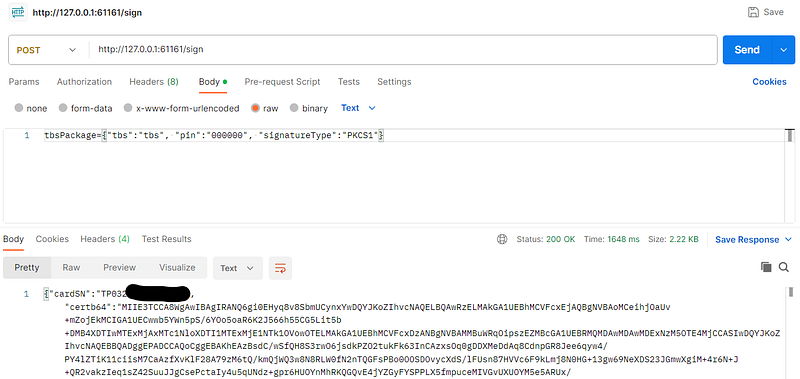
上一篇說明了HiPKI Local Server 的數位簽章 API 原理,接著就可以操作 http://127.0.0.1:61161/sign。
/sign 的 Request
HiPKI Local Server 提供了數位簽章 API,讓網頁可以呼叫 API 來使用,先說明一下 API 的 Request 如下:
POST http://127.0.0.1:61161/signContent-Type: text/plain
tbsPackage={"tbs":"TBS","pin":"000000","hashAlgorithm":"SHA256","signatureType":"PKCS1","slotDescription":"My Reader"}必填欄位:
- tbs (To be signed)
必填
原文,要被簽章的文字
▶ 備註:當 signatureType**=**RAW,tbs 放「DER 編碼的 Hash」 的 Base64,下一篇會介紹 - pin
必填
卡片 PIN 碼
選填欄位:
- signatureType
選填
簽章標準
▶ 選項:PKCS1、PKCS7、RAW
▶ 預設:PKCS7
▶ 備註:RAW 採用 PKCS1 - tbsEncoding
選填
tbs 欄位的編碼
▶ 選項:none、base64
▶ 預設:none
▶ 備註:RAW 固定為 base64 無法修改 - hashAlgorithm
選填Hash 演算法
▶ 選項:MD4、MD5、SHA1、SHA224、SHA256、SHA384、SHA512、SHA3–224、SHA3–256、SHA3–384、SHA3–512、RIPEMD (RIPEMD160)
▶ 預設:SHA256
▶ 備註:RAW 的 Hash 演算法依 tbs (DER 編碼的 Hash)決定,無須填此欄位 - slotDescription
選填
讀卡機名稱
▶ 預設:第一個讀卡機
▶ 備註:/pkcs11info、/p11Image.bmp 有相同欄位 - keyidb64
選填
憑證 ID 的 Base64
▶ 預設:U0lHTg== (SIGN,簽章憑證)
▶ 選項:U0lHTg== (SIGN,簽章憑證)、S0VZWA== (KEYX,加密憑證) - checkValidity
選填簽章前,檢查使用者系統時間是否在憑證有效期間內
▶ 選項:true、false
▶ 預設:true - func
選填
功能
▶ 備註:popupForm 用的欄位,簽章用 MakeSignature
PKCS7 專用欄位:
- nonce (Number once)
選填一次性數字,增加簽章的隨機性
▶ 預設:空字串 - withCardSN
選填
簽章值是否要包含卡號
▶ 選項:“true”、“false”
▶ 預設:“false” - withSigningTime
選填
簽章值是否要包含簽章時間
▶ 選項:“true”、“false”
▶ 預設:“true”
另外開頭的tbsPackage=並沒有意義,可省略,但官方範例皆有,可能是為了兼容舊版本 HiPKI Local Server。
/sign 的 Response
當簽章成功的時候,會回傳以下資訊。
HTTP 200 OKContent-Type: text/plain; charset=utf-8
---{"cardSN":"TP03200300000000","certb64":"XXX","func":"sign","last_error":0,"ret_code":0,"signature":"XXX","version":"2.5.5"}欄位說明:
- cardSN:自然人憑證卡號
- certb64:簽章用的公鑰,為 Base64 格式,與 /pkcs11info 中簽章用的公鑰相同
- signature:簽章後的簽章值,為 Base64 格式
- func:功能,固定回傳 sign,代表操作為簽章
- last_error:固定回傳 0
- ret_code:簽章成功會回傳 0
- version:可能是程式的版號
我們可以透過公鑰(certb64)為簽章後的簽章值(signature)進行解密,如果與原文(tbs)相同,代表驗簽通過。
常見的錯誤
當 Request 資料有誤,可能產生以下錯誤訊息。
- 未填 tbs 或 pin
POST http://127.0.0.1:61161/signContent-Type: text/plain
tbsPackage={"tbs":"TBS"}
---HTTP 400 Bad RequestContent-Type: text/plain
require tbs and pin- pin 錯誤
POST http://127.0.0.1:61161/signContent-Type: text/plain
tbsPackage={"tbs":"TBS", "pin":"123456"}
---HTTP 200 OKContent-Type: text/plain; charset=utf-8
{"func":"sign","last_error":-2147483646,"ret_code":1980760070,"version":"2.5.5","message":"IC卡登入失敗","message2":"PIN碼錯誤,剩餘兩次機會"}- hashAlgorithm、signatureType 內容錯誤
POST http://127.0.0.1:61161/signContent-Type: text/plain
tbsPackage={"tbs":"TBS", "pin":"123456", "hashAlgorithm":"SHA1234"}
---HTTP 200 OKContent-Type: text/plain; charset=utf-8
{"func":"sign","last_error":0,"ret_code":1979711500,"version":"2.5.5","message":"參數錯誤"}- TBS Base64 解碼錯誤
POST http://127.0.0.1:61161/signContent-Type: text/plain
tbsPackage={"tbs":"TBS", "pin":"123456", "tbsEncoding":"base64"}
---HTTP 200 OKContent-Type: text/plain; charset=utf-8
{"func":"sign","last_error":0,"ret_code":1986002946,"version":"2.5.5","message":"Base64解碼錯誤"}- 找不到讀卡機
POST http://127.0.0.1:61161/signContent-Type: text/plain
tbsPackage={"tbs":"TBS", "pin":"123456", "slotDescription":"Test"}
---HTTP 200 OKContent-Type: text/plain; charset=utf-8
{"func":"sign","last_error":0,"ret_code":1979711494,"version":"2.5.5","message":"未插入IC卡"}- 不支援的 Hash 演算法,如:SHA512–224、SHA512–256、SHAKE128、SHAKE256、Whirlpool、SM3
POST http://127.0.0.1:61161/signContent-Type: text/plain
tbsPackage={"tbs":"TBS", "pin":"123456", "signatureType": "PKCS1","hashAlgorithm":"SHAKE128"}---HTTP 200 OKContent-Type: text/plain; charset=utf-8
{"cardSN":"XXX","func":"sign","last_error":0,"ret_code":1982857220,"version":"2.5.5","message":"簽章執行錯誤"}結語
透過 HiPKI Local Server 的 sign API,就可以做 PKCS#1 、PKCS#7 的數位簽章,可用於文件簽章或是身份驗證等功能。
▶ 閱讀更多:深入淺出自然人憑證